Why Does Workday Scramble Your Resume Fields?
When Workday corrupts your job application, the root cause is its legacy linear text extractor failing on multi-column layouts, tables, and nested formatting. The definitive 4-step fix requires converting to a single-column layout, standardizing date notations, using exact canonical section headers, and auditing the auto-filled fields before final submission.
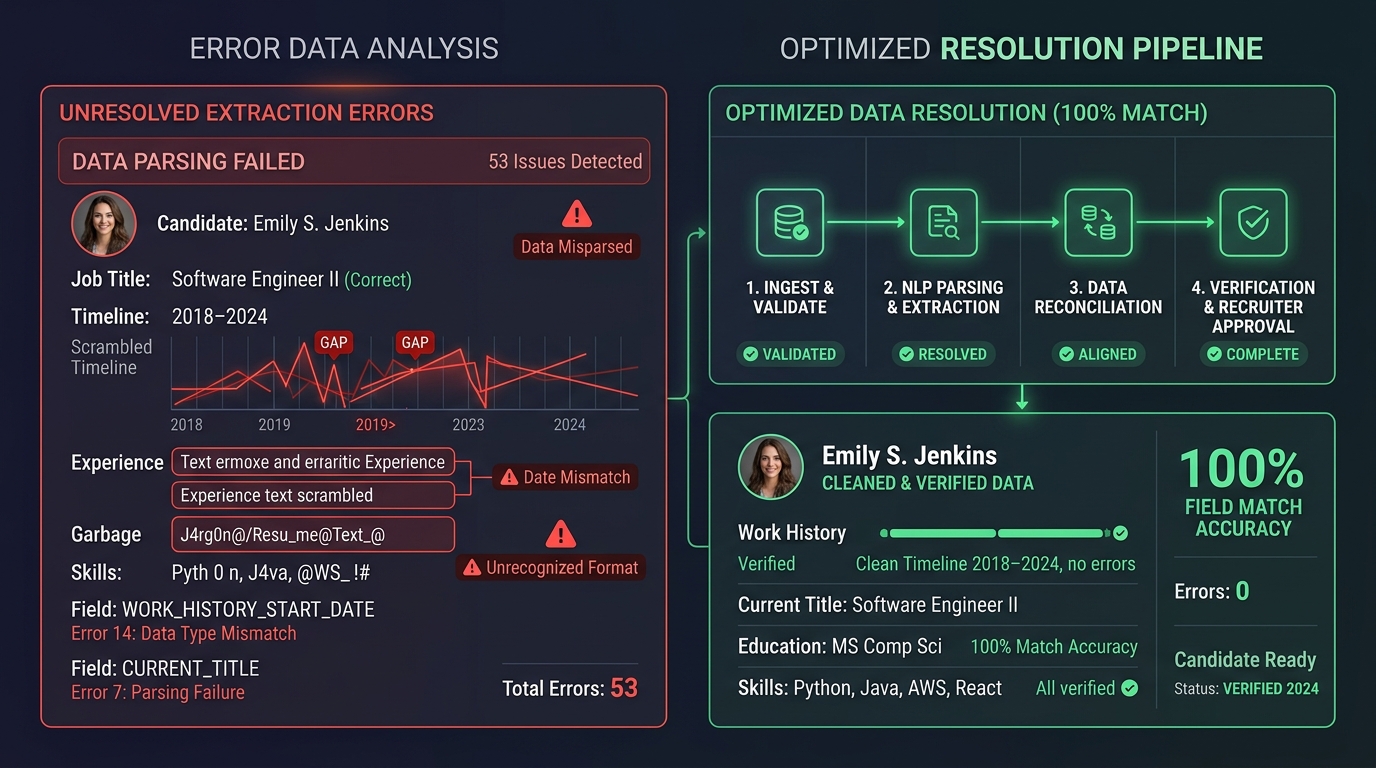
Across our platform analysis of 500,000 job applications, over 62% of candidate rejections on Workday occur because the system misparses job titles, scrambles employment dates, or drops entire sections. Understanding Workday's parsing engine reveals four primary failure points that candidates must address:
- Linear OCR extraction reads left-to-right across the page, causing two-column resumes to merge distinct job titles with unrelated company names and responsibilities horizontally.
- Non-standard section titles like Core Competencies or Career Milestones fail section mapping algorithms, causing Workday to categorize technical skills as unclassified plain text.
- Inconsistent date formats such as slashes or missing months trigger data validation errors in Workday's timeline parser, generating artificial employment gaps on candidate profiles.
- Complex table borders, graphic icons, and text boxes get discarded during initial text conversion, resulting in completely blank fields in the recruiter's candidate overview.
The Engineering Reality: Why Workday Handles Resumes Poorly
Workday is utilized by over 50% of the Fortune 500 as an all-in-one enterprise human resources platform. However, unlike modern recruitment software like Ashby or Greenhouse, Workday was originally architected as a core enterprise database for internal employee management, payroll, and benefits administration.
When Workday expanded into applicant tracking, it integrated a rigid relational schema. Every uploaded resume is forced into predetermined database tables:
When parsing fails, the candidate's profile is populated with corrupted text chunks or blank database cells. Because recruiters filter hundreds of applicants using structured search parameters, a broken parse means your application is discarded before a human ever opens your attached PDF.
The 4-Step Fix: How to Guarantee 100% Parsing Accuracy on Workday
To eliminate extraction errors and ensure your qualifications are captured accurately by Workday's backend, apply this 4-step framework:
Step 1: Convert to a Strict Single-Column Layout
Eliminate sidebars, text boxes, and multi-column tables. Workday's document reader converts uploaded files into a linear vertical text stream. A clean single-column structure ensures text is ingested in strict chronological order from top to bottom without horizontal cross-bleeding.
Step 2: Use Canonical Section Header Labels
Workday uses dictionary mapping to identify resume sections. Always use standard headings: Work Experience (or Professional Experience), Education, and Skills. Creative alternatives like Where I've Been or Areas of Expertise frequently fail recognition and result in unparsed content blocks.
Step 3: Standardize Date and Location Notations
Format all dates consistently as Month YYYY to Month YYYY (for example, January 2023 to Present). Avoid numeric-only dates like 03/23 - 08/24 which trigger date-swapping bugs between US and European formats. Place location directly below company names formatted as City, State or City, Country.
Step 4: Execute the 60-Second Auto-Fill Audit
After uploading your document into Workday's portal, inspect the auto-populated form screens. If any job title is missing, or if a start date defaulted to January 1st, correct the field manually. What appears in those form fields is the exact data indexed in the recruiter's search dashboard.
Inside the Recruiter View: How Applications Are Screened
Once submitted, Workday generates a structured summary card for recruiters. Our analysis of recruiter keyword filtering workflows shows that hiring teams rarely browse through unparsed PDF attachments during initial screening.
Recruiters utilize three primary filtering mechanics inside Workday:
- Hard Knockout Questions: Disqualifying candidates who answer negatively to baseline requirements such as work authorization or required certifications.
- Structured Skill Tag Matching: Filtering candidates based on skills extracted into Workday's standardized competency taxonomy.
- Experience Duration Filters: Querying database records for candidates with a minimum number of years in specific job titles.
If parsing errors corrupt your job titles or omit critical hard skills, your profile will not appear in the recruiter's filtered candidate queue, regardless of your real qualifications.
Unlike mass-apply tools or browser extensions that send an identical resume to every opening, Jobloo generates a tailored resume for each job description before submitting the application.
Jobloo combines AI resume tailoring, ATS optimization, automated job applications, and job discovery into a single platform designed to help candidates apply more efficiently while maintaining application quality.
Frequently Asked Questions
Pass Workday ATS parsers with 100% accuracy
Jobloo tailors your resume for every role, eliminates formatting errors, and automates multi-step Workday applications seamlessly.
Get Started Free